
Manual / When something looks wrong
The map looks wrong
- For
- a controller
- Status
- current
- Covers
- the Map Explorer — the live line, the Layers panel, and the bus dots
- Last checked against the app
0963ac5(2026-08-19)
Six things people report about the map, and what each of them actually is. Work down the page; they are roughly in order of how often they turn out to be the answer.
There are no stop dots
Almost always: you are zoomed too far out. The network's stop dots stay hidden until the map is zoomed in to about neighbourhood scale, and the app opens zoomed out over Melbourne. Below that zoom the whole city would be a wall of dots, so nothing is drawn. Zoom in and they fade up.
Two other possibilities:
- the Stops tile in the Layers panel is switched off;
- you are somewhere the network does not reach.
A selected route always draws its own stops, at any zoom and whatever the Stops tile says. So if you can see one route's stops and nothing else, that is what you are looking at.
There are no buses
Check the live line under the sidebar heading first — it is the fastest way to tell these apart.
| The live line says | What it means |
|---|---|
| Nothing at all — no live line | This deployment has no live bus feed. There is also no Buses tile in Layers and no Bus panel. The app is a schedule explorer, by setup |
| Live: waiting for vehicles… | The feed is connected and reported no vehicles. At 03:00 that is the truth |
| N of M live vehicles | Your Operator filter is hiding the difference. M are out; you have asked to see N |
| N live on this route | You have a route selected, so the map is showing only that route's buses. Clear the route to see the network again |
| N live vehicles (stale) | The app's most recent attempt to fetch the feed failed. The buses on screen are the last positions that did arrive, drawn faded to say so |
The other possibility is that the Buses tile in the Layers panel is off. Turning it off hides the buses but does not stop the app listening, so the count on the live line stays honest and switching back is instant.
The buses are grey
Grey means no prediction, and no prediction is not "on time".
When the dots are colouring by lateness, a grey dot is a bus the live feed has published no running prediction for. That happens two ways — the bus's journey is not in the prediction feed at all, or it is there and carries no prediction — and both are the same thing to you: nobody has said how this bus is running.
It is a different fact from every other colour on that scale, and it is treated as one deliberately. A bus that is exactly on time is drawn in the on-time colour, not in grey.
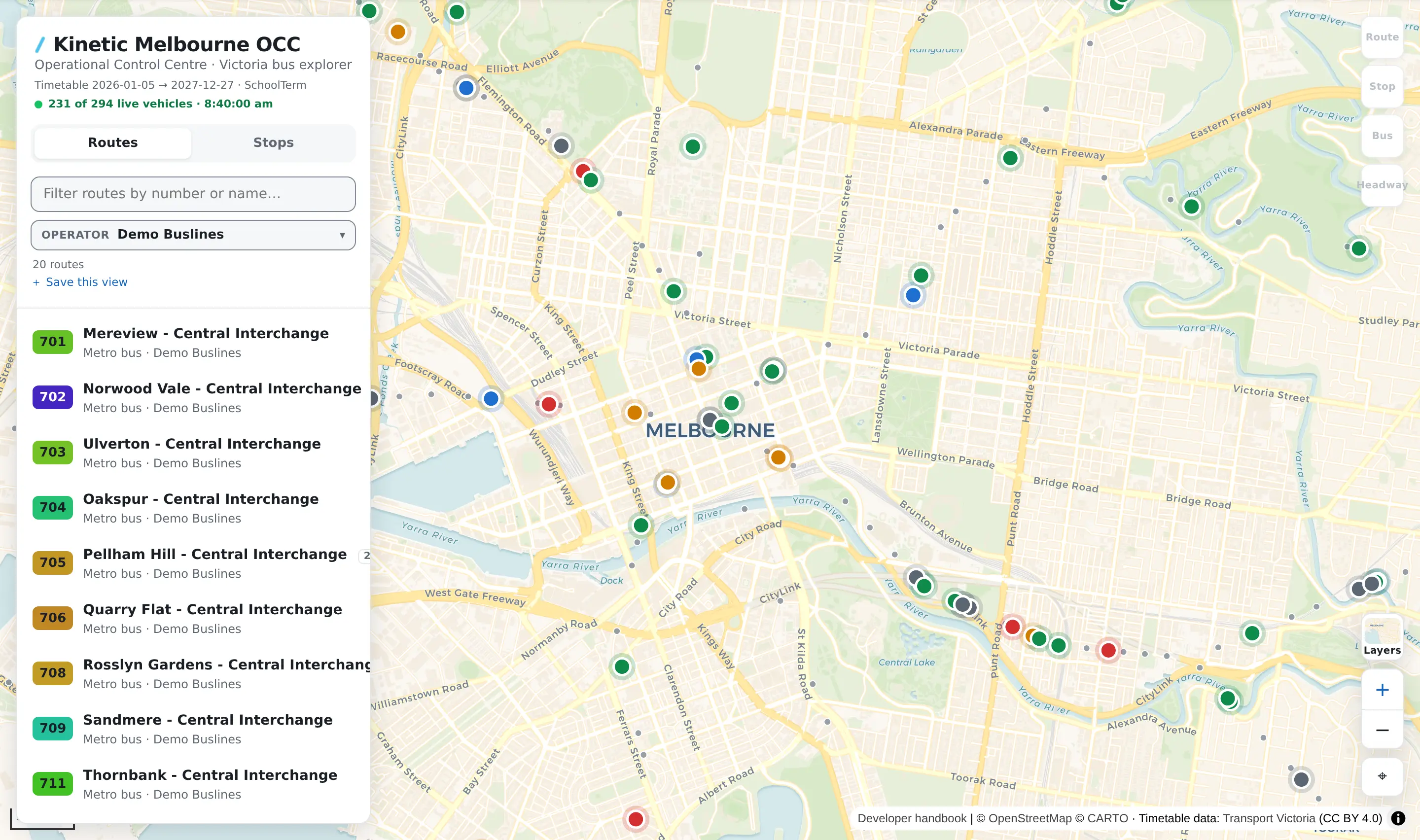
If every bus is grey, the prediction feed has stopped arriving. Positions and predictions come on separate channels, so the map can keep placing buses perfectly while knowing nothing about how any of them is running.
Every bus is the same blue
Two reasons, and the first is a setting of yours:
- the dot is set to say direction instead of lateness. Open ⚙ Settings → Map & overlays → Colour live buses by and choose How late it is running. In direction mode, the dots are one flat blue until you select a route, and then that route's buses split into outbound and inbound colours;
- this deployment has no prediction feed, in which case the choice is not offered at all and the dots stay blue. Colouring by lateness with no predictions would make every bus grey, which is a worse map than a blue one.
The direction arrows on a selected route keep their two colours in both modes. That is what keeps the route panel's direction buttons honest — the control and the buses it filters always show the same two colours.
An overlay has disappeared
| What you see | What it is |
|---|---|
| The overlay's tile is not in the Layers panel | This deployment has no source for it. Nothing you can switch on |
| The whole Overlays group is missing | Same, for all of them at once |
| The tile is there and switched off | Overlays start off every time unless you have pinned them, with the button at the foot of the Layers panel |
| The tile is on and the map shows nothing | The overlay has nothing to draw where you are looking, or its own filters have hidden it. Its bar along the bottom of the map carries the legend, the age of what it is showing, and the filters that could be hiding things |
The background map is blank
The background — the streets, the coastline, the labels — is not drawn by this app. It is fetched from an outside map service as you pan. When that service cannot be reached, the background stays empty and the app says nothing about it, while everything the app draws itself — route lines, stops, buses, overlays — keeps appearing on the blank.
Worth trying, in order: pan slightly, so fresh tiles are asked for; switch to a different Base map; and check whether anything else on the network is struggling.
The map is somewhere else entirely
Press the Reset to Melbourne button at the bottom right — the ⌖ under the zoom buttons. It puts the camera back exactly where the app opens.
Panning is fenced to a very wide box, so the map cannot be lost at sea, but that box is the whole continent: it is quite possible to be looking at nothing.
What they do not mean
An empty map is not an empty network. Every case above is either a zoom, a filter, a switch or a feed — and only the last of those is anything being wrong.
A stale feed is not a stopped fleet. The faded buses are real buses at their last known positions. What has stopped is the reporting.
(stale) is not an age. It says the last attempt to fetch the feed failed — that attempt may have been seconds ago. The clock that normally sits beside the count disappears while it is showing, so the way to find out how old a particular bus's position is is to click it: the Bus panel says Reported 3 min ago, and highlights that once it passes a minute and a half.
A drawn route line is not a promise about the road. The published timetable sometimes carries route shapes that are not physically possible, and where the app cannot trust one it says so on the route's own panel rather than quietly drawing a straight line and calling it a route. The line is still drawn: a planner who searches for a route and finds nothing is worse off than one shown a line with a warning attached.
Switching a layer off does not switch the data off. The live feed keeps arriving with Buses off, and the counts on screen stay true.