
Manual / Personalising the app
What Reset actually does
- For
- a controller
- Status
- current
- Covers
- the Reset link beside a setting, Reset everything, and the ⚙ Watch and alarm thresholds popover's Reset to the defaults
- Last checked against the app
6f7727e(2026-08-19)
Reset does not save anything. It deletes your answer. That sounds like a distinction without a difference and it is not, so this page is the whole of it. It is the one behaviour in the settings panel most worth understanding, because the intuitive reading of the word is the wrong one.
What you are looking at
| Control | Where | What it does |
|---|---|---|
| Reset | Beside a setting's name in ⚙ Settings — and only where you have stored a choice for that setting | Deletes your choice for that one setting |
| Reset everything | Along the foot of ⚙ Settings | Deletes your choices for every setting at once. Asks "Reset every setting to this deployment's defaults?" first, and says Settings reset. when it is done |
| Reset to the defaults | At the foot of the ⚙ Watch and alarm thresholds popover on the Bus frequency bar | Puts the four headway numbers back to the ones this deployment was set up with |
Hovering a setting's Reset spells out what it means: "Forget my choice for '…' and follow the default again." That sentence is the accurate one.
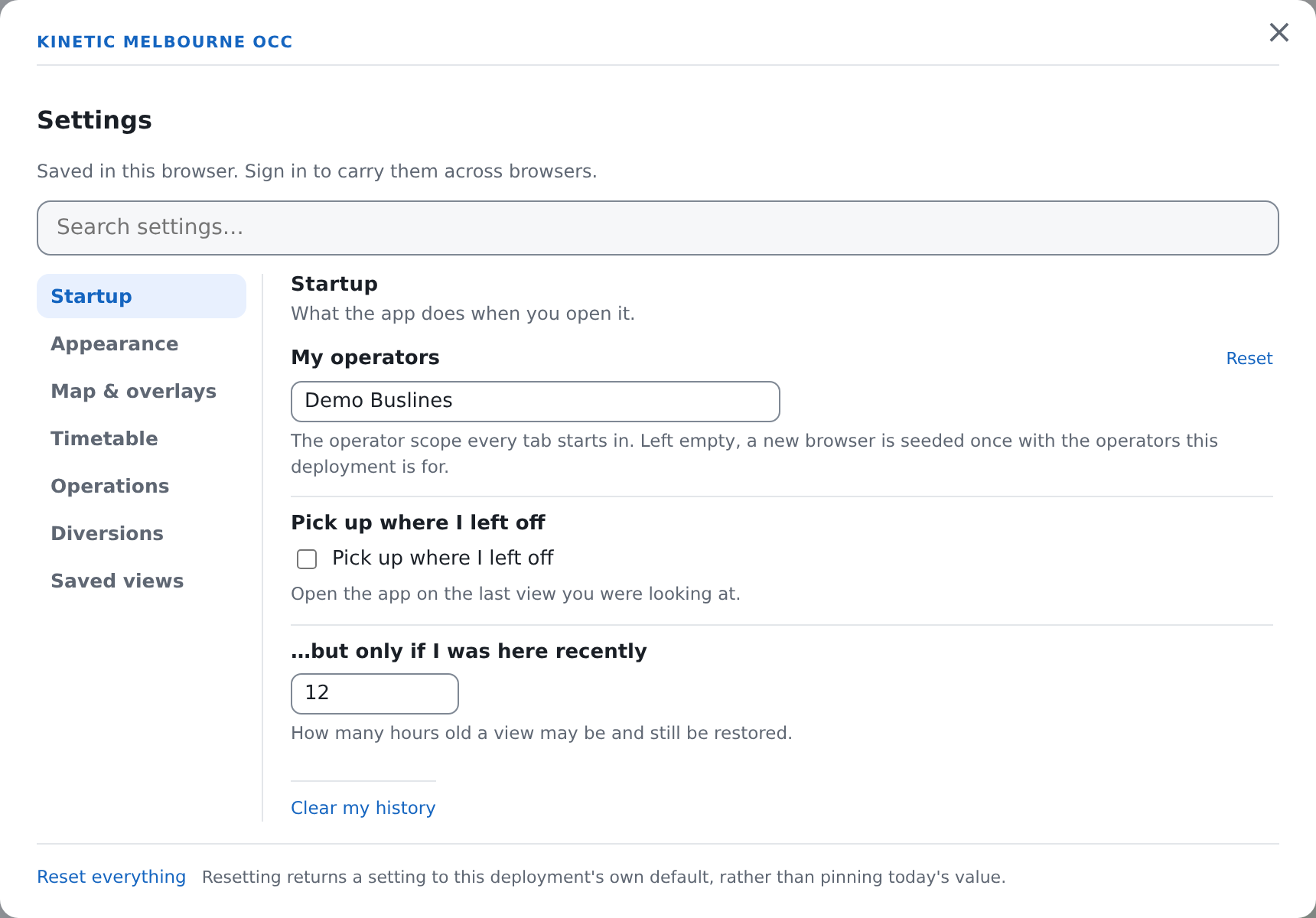
That difference is the whole tell. The top setting in that picture has a stored choice; the two under it do not, and their values are coming from the app's own default or this deployment's.
Three answers stacked, and yours is only the top one
Every setting in this app has up to three answers behind it, and the app uses the most specific one it has:
- what you chose — if you have chosen;
- what the app ships with — the sensible general answer;
- what whoever set this deployment up chose — for the handful of settings where the app has deliberately no opinion of its own, and defers.
The headway watch and alarm lines are the clearest example of the third. The app does not ship a house answer for them, because what counts as a bad gap is a decision about this network, and the person who set the deployment up has made it.
Reset removes step 1. It does not write step 2 or step 3 into your account — it takes your answer away so the app falls through to whichever of them applies.
Why deleting is the right way round
Consider the alternative: Reset looks up today's default and stores it as your preference.
The screen would look identical. You would see the default value in the box, the same as you do now. And then, six months later, whoever runs the app changes that default — a tighter headway alarm across the control room, a different operator scope after a contract change — and it would not reach you. You would be sitting on a preference you never knowingly set, pinned to a number that was current on the afternoon you pressed a button labelled Reset.
Absence keeps meaning "defer to this deployment", and that is what lets a later change made centrally actually arrive. Storing today's values as your own preference pins them forever, silently, in the one place nobody would think to look.
This is not theoretical. The headway popover's Reset to the defaults used to do exactly the wrong thing, and it was fixed for exactly this reason.
What Reset does not touch
Reset everything leaves two kinds of thing alone.
Your radio volume. The volume slider is activity rather than a choice — it moves on every drag — so it is deliberately not swept up by "reset my settings", which nobody means to include the loudness they left the radio at. Resetting the Radio volume control on its own still works; that is a deliberate act.
Anything that is not a setting. Where you have been in this session is kept separately and is cleared by Clear my history in Startup, which asks "Forget the views this browser has recorded?" first. Which traffic bulletins you have heard is kept separately again, and Reset everything does not touch it; the radio panel's own Mark unheard is the way to change it.
The one place an explicit empty beats a Reset
Your operator scope has a deliberate exception, and it is worth knowing because it looks like an inconsistency.
The Operator filter's pin button reads "Clear my default scope" when you have no operators ticked. Pressing it does not reset the setting — it stores "no operators" as your explicit answer.
That is on purpose. This deployment seeds a first-time user with the operators it is for, and a user who genuinely wants no default scope needs an answer that outranks that seed. A Reset would delete the row and let the seed apply again on the next load, which is precisely the thing the button exists to make impossible. See Your operators and your depot.
What they do not mean
Reset is not undo. It puts a setting back to a default, not back to what it was a minute ago. There is no history of your settings and nothing that steps backwards through them.
Reset everything is not "sign me out" and not "clear this browser". Your account, your session and your saved views are all untouched — except that saved views are a setting, so Reset everything does clear the list of them.
A setting with no Reset link is not one you cannot change. It means you have not stored a choice for it: the value on screen is coming from the app's own default or the deployment's. Change it and the link appears.
Reset does not reach anybody else. These are your settings, on your account or in your browser. Nothing you reset changes what a colleague sees.
And on a browser where you are signed out, "the default" is still the deployment's. Resetting while signed out clears what this browser stored; the app then falls through to the same two answers underneath.