
Manual / Diversions
Approval, and what it freezes
- For
- a controller about to sign a diversion off, and anyone who has just found they cannot edit one
- Status
- current
- Covers
- the Move to Approved control, the frozen-plan notice on a record, and Move to Draft
- Last checked against the app
6f7727e(2026-08-19)
Approving a diversion is the moment its plan stops moving. It is also the thing most often reported as a fault — "I can't edit it" — so this page is what freezes, what does not, and why a register that let an approved record change would be worse than useless.
What you are looking at
On a draft's detail pane: Edit, Move to Approved, Move to Retired, Duplicate for direction 1 (or 0) and Delete draft.
Press Move to Approved and the app asks first:
Approve DIV-2026-0007?
This freezes the plan as it resolves against the loaded schedule. From then on its documents render from that frozen snapshot and are no longer watermarked — drivers can be issued them.
Afterwards the pane looks different. Edit is gone, the row's Plan and Edit shortcuts are gone, the map no longer drags, and a line appears above the figures:
Showing the plan frozen at approval — this is what its documents say. Documents never re-render from live data.
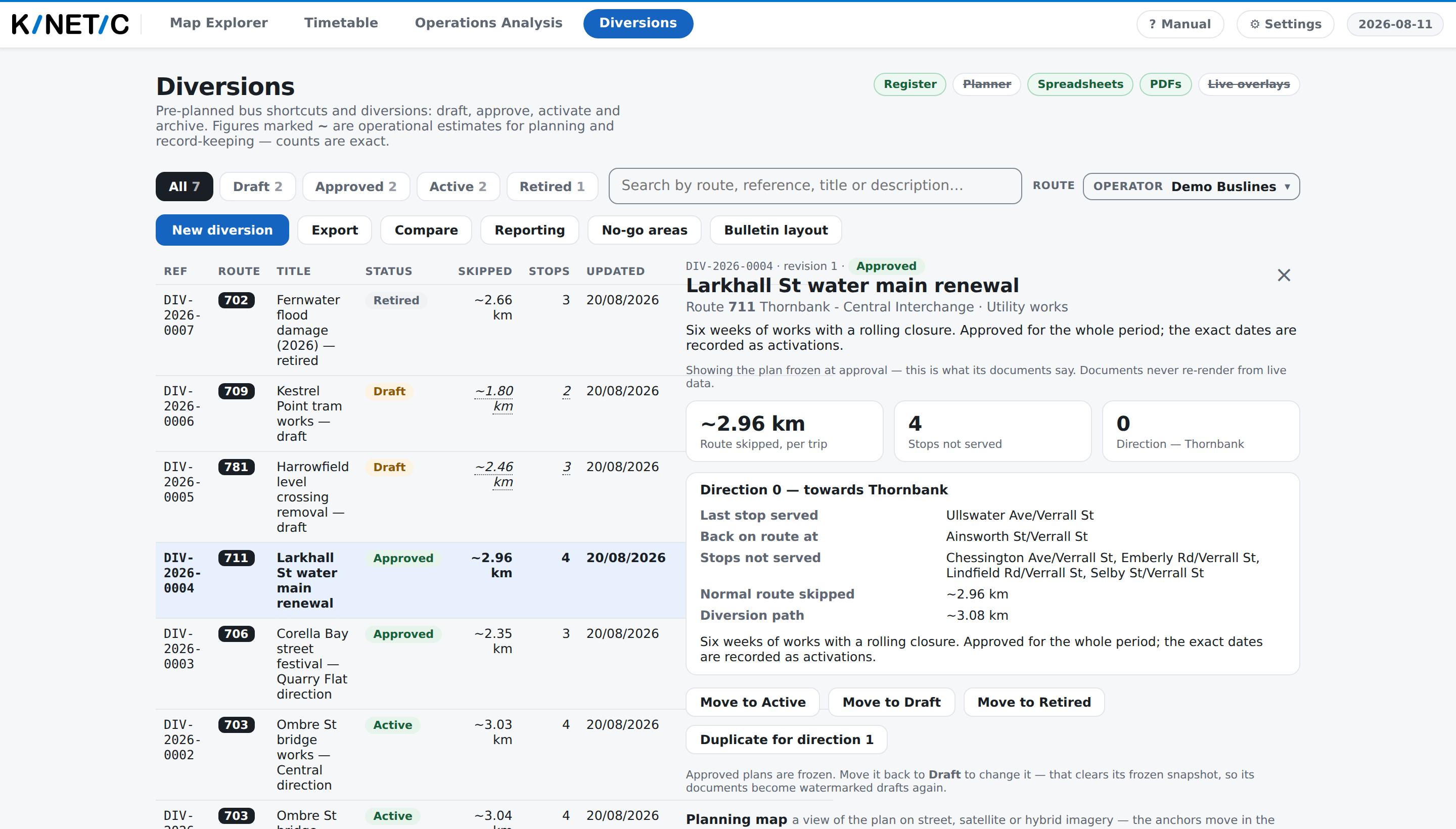
with, in place of the editing controls:
Approved plans are frozen. Move it back to Draft to change it — that clears its frozen snapshot, so its documents become watermarked drafts again.
What gets frozen
Everything a document is drawn from, as it stood at that moment:
- which stops are not served, by name, and how many;
- the kilometres of route skipped, and the drawn path's own length;
- the two anchors, as resolved against the timetable that was loaded then — the last stop served and where the bus is back on route;
- the driver bulletin: every step, its wording, its notes, its distances and the small map printed beside each turn;
- anything you drew on the plan, and the view you saved for the document's overall map.
From then on, every document the record produces is rendered from that, not from today's data. A bulletin filed in March cannot start narrating a different street in June because a newer timetable was loaded or the road network was re-surveyed underneath it.
That is the whole reason. Drivers act on these documents. A record that could change after it was issued would make "the version we sent out" unanswerable.
What does not get frozen
The state. An approved record still moves: to Active when it goes into force, back to Approved when it is stood down, and to Retired at the end. None of those touches the plan.
How the document is laid out. The Bulletin layout panel is register-wide
and applies to every document at the moment it is produced, so re-printing an
approved diversion after somebody changes the letterhead gives a page that looks
different. What it says cannot change — the watermark, the provenance block,
the ~ marks, the list of stops not served and the timing block are fixed for
every layout. See The documents.
What the app thinks today. The record is still resolved against the loaded timetable every time you open it, and where the two disagree the pane says so. That difference is the news: it is what tells you the world moved under a document that has already gone out.
Activation windows. A record of when the diversion actually ran sits beside the plan rather than inside it, and carries frozen figures of its own. Note that nothing in this tab records one — see Activations.
Sending one back
Move to Draft is the way to change an approved record, and it is not a quiet one: it clears the freeze. The record's documents go back to being watermarked drafts, because there is no longer a signed-off resolution for them to cite. Approve it again and a fresh plan is frozen — the one that resolves now, not the one that resolved before.
Two things cannot come back:
- Delete exists only on a draft. Anything that has been approved can only be Retired, so the record of what was issued survives;
- Retired is the end. There is no move out of it. Retiring asks for a reason, and it is worth writing one: "works finished; road reopened" is what this record reads as in a year.
When approval is refused
A record that does not resolve cleanly cannot be approved at all. The app refuses with the reason rather than freezing a broken plan:
this diversion does not resolve cleanly against the loaded schedule (its anchors moved or its route/direction is gone) — re-confirm it before approving
That happens in three situations, and the record says which:
- the route or direction has left the loaded timetable. The record still opens — a bad feed must not lock its own history away — but it carries a warning and asks to be re-confirmed;
- an anchor moved further than the app will apply silently. The anchors are remembered against the stop next to them, so a newer timetable that shifts the route slightly is absorbed. Past a threshold it is not, and the record says "an anchor moved under a feed refresh — re-confirm where this diversion leaves and rejoins the route", with the distance beside it as Anchor drift. The alternative would be a document telling a driver to turn left at a corner the bus no longer passes;
- the record has no anchors yet.
The sentence you will actually see at the top of such a record is:
This diversion does not line up with the loaded schedule any more — its anchors moved or its route changed. Re-confirm where it leaves and rejoins the route before approving or issuing it.
Re-confirming means opening the plan, looking at where the anchors now sit, and saving. Nothing is moved for you.
What they do not mean
Frozen is not measured. The frozen figures are the same estimates they were
before approval; freezing fixed which estimate the documents state, not how
they were arrived at. They still print with a leading ~.
Frozen is not "still correct". A record approved against a timetable that has since been replaced is honestly stale, and the app's answer is to keep showing what was frozen and tell you that today's data disagrees. It never silently re-freezes.
Approved is not in force. Approved means signed off and ready; Active means in force now. Moving between them is a controller's statement about the road, not something the app can observe.
Active is not a claim that the road is closed. Nothing about a road feed moves a record between states. Where a record was started from a road incident, the app can tell you what that incident's feed says today — but that is a prompt, never a state change.
A watermarked document is not a broken one. It is a correct document about a plan nobody has signed off. An unwatermarked page is a positive claim that this plan is approved and current, which is precisely why the watermark is not something any setting can switch off.
Two prints of one record can differ legitimately. If it went back to Draft in between, the second print is a draft rendered from live data and says so in its own footer.