
Manual / Getting started
What this tool is
- For
- a controller opening it for the first time
- Status
- current
- Covers
- the app as a whole — the browser title, the sidebar heading and the four tabs
- Last checked against the app
0963ac5(2026-08-19)
Kinetic Melbourne OCC is the tool built for Kinetic Melbourne's Operational Control Centre. It puts the published bus timetable, where the buses actually are, what the roads are doing and who is rostered to drive on one screen, so that a question you would otherwise answer from four places can be answered from one.
The browser tab calls it Kinetic Melbourne OCC — Victoria Bus Explorer, and the heading down the left of the map says the same thing with the subtitle Operational Control Centre · Victoria bus explorer.
What you are looking at
This is the app as it opens — the four tabs across the top, the route list down the left, and the network with its live buses on it. It is worth comparing against your own screen before reading on: what you have may be less than this, and the reason is almost always that your deployment was not given one of the sources below.
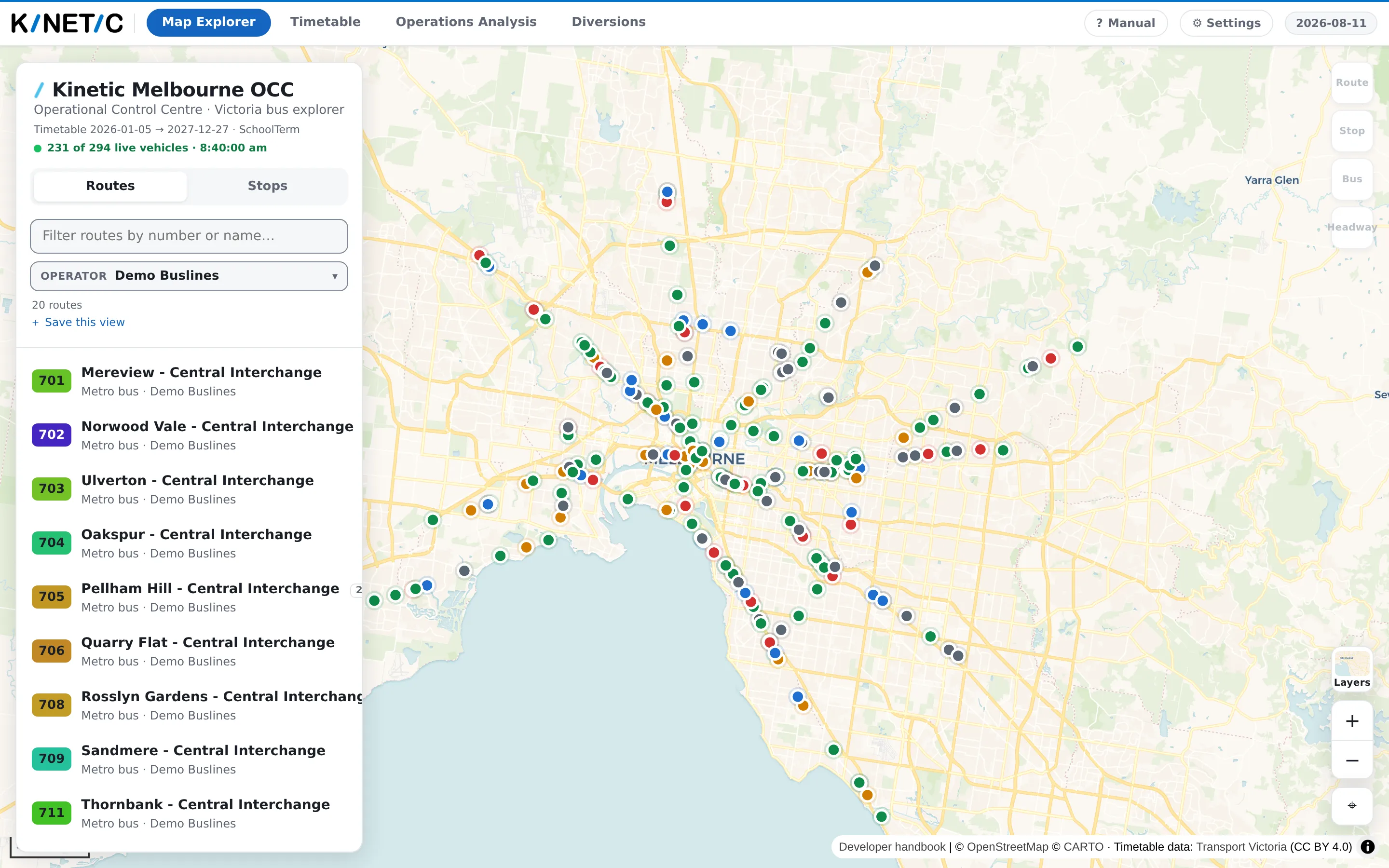
Four tabs across the top, and each is a whole screen of its own.
| Tab | What it is for |
|---|---|
| Map Explorer | The map. Find a route, open a stop, watch the live buses, and switch on the overlays — traffic, road incidents, low clearances, bus frequency |
| Timetable | The published schedule for one route on one date, read as a table, as a proportional strip, or as a string diagram — with live running laid over it |
| Operations Analysis | The driver roster: depots, shifts, buses, handoffs, and where the day is tight. Usable only when a roster has been loaded, and only by an account allowed to see it |
| Diversions | The register of planned and active diversions: what is diverted, where it leaves and rejoins the route, and the paperwork that goes out with it |
You do not have to use them in order, and the app remembers nothing about where you were unless you ask it to — see Finding your way back.
Where the information comes from
Nothing on these screens is invented by the app. Five sources feed it, and knowing which is which is most of knowing what a number is worth.
| What you see | Where it comes from |
|---|---|
| The timetable, the routes, the stops | The state's published bus timetable, loaded as a whole and refreshed when someone loads a newer one |
| Live bus positions, and how late each one is running | The road authority's live bus feed — positions on one channel, running predictions on another |
| Traffic, road incidents, low clearances | Road feeds and a road extract from the state's mapping and traffic data |
| Depots, shifts, runs, handoffs | The Kinetic Melbourne driver roster — confidential, and the reason the Operations Analysis tab needs an account |
| Traffic radio bulletins | A public radio traffic bulletin feed, played back in the app |
Every one of them is optional except the timetable. Nothing runs without a timetable loaded; everything else is a layer that switches itself on when the deployment has it and stays out of the way when it does not.
What it will not do
- It does not talk to a bus, a driver or a ticketing system. Nothing you click here changes what is happening on the road.
- It does not change the timetable. The schedule it shows is the published one, loaded whole. If it is wrong, it is wrong upstream and a newer one has to be loaded.
- It does not keep a history of the live feed. What the map showed an hour ago is gone; there is no replay and no archive of yesterday's running. Where historic running times are available, they were loaded from an official export — measured by the authority, not collected by this app watching.
The one thing it produces that people act on is a diversion's paperwork — the driver instructions and the bulletin. Those are documents you generate here and send out by whatever route your control room already uses. Producing one does not issue it.
What they do not mean
"Live" means "last published", not "now". Every live figure on these screens is what the feed said the last time the app asked, which is a matter of seconds or minutes ago, not this instant. Where the app knows the age of what it is showing, it puts it on screen — the live line under the sidebar heading carries the feed's own clock, and each overlay's bar carries its own.
A missing control is a missing source, not a fault. This app hides what it cannot do rather than offering a button that fails. If a tile, a tab or a toggle is not on your screen and is described here, the honest reading is "this deployment was not given that", not "the app is broken". The one deliberate exception is Operations Analysis, which stays visible and faded so that its absence is legible — see A tab is greyed out.
Nothing here is a contractual figure. The diversion figures are operational
estimates and are printed with a leading ~ to say so. The punctuality figures
describe the running that was recorded, not what a performance regime would
count. Where a page in this manual shows a number, it also says what that number
cannot tell you.